๐Ÿ’’
๐Ÿ’
๐Ÿ‘ฐ
๐Ÿ’
โค๏ธ
Free Wedding Memorial Photo Editor

Wedding Memorial Photo Editor
Add Deceased Loved Ones Free

Honor their memory on your special day. Add deceased parents, grandparents, or loved ones to wedding photos with our free AI-powered memorial photo editor.

Create touching images of your deceased father walking you down the aisle, family portraits with passed grandparents, or beautiful guardian angel presence. Instant AI generation, print-ready quality.

100% Free
AI-Powered
300 DPI Quality
Instant Results

Why Add Deceased Loved Ones to Wedding Photos?

Your wedding day is one of the most important moments in your life, but it can be bittersweet when loved ones who have passed away can't be there to celebrate with you. A deceased father who can't walk you down the aisle, grandparents who didn't live to see you married, or a mother who can't help with wedding preparations - their absence is deeply felt.

Our free AI wedding memorial photo editor helps you honor their memory by creating beautiful portraits that include them in your special day. Whether you want your deceased dad walking you down the aisle or grandparents standing in your family wedding portrait, AI technology makes it possible.

Benefits of Wedding Memorial Photos

  • Honor Their Memory: Include deceased parents, grandparents, or loved ones in your most important photos.
  • Complete Your Family: Create wedding family portraits that include everyone who matters, past and present.
  • Healing Through Art: Creating and displaying these photos can bring comfort during a bittersweet celebration.
  • Treasured Keepsake: A wedding memorial photo becomes a precious heirloom for generations to come.
  • Share Their Presence: Let guests and family feel their presence through beautiful memorial portraits displayed at the wedding.
  • Fulfill Their Dream: Include them in the day they always dreamed of seeing - your wedding.

Wedding Memorial Photo Styles

Choose from beautiful artistic styles to match your wedding aesthetic and create the perfect memorial tribute.

๐Ÿ“ธ

Photorealistic

Natural-looking wedding photos that appear as if your loved one was actually there. Perfect for wedding albums.

๐ŸŽจ

Watercolor

Soft, romantic watercolor style that adds an artistic, dreamlike quality to wedding memorial portraits.

โœ๏ธ

Charcoal Sketch

Classic, timeless charcoal illustration style that creates elegant, sophisticated memorial art.

๐Ÿ–ผ๏ธ

Oil Painting

Rich, textured oil painting style for a classic, museum-quality memorial portrait.

๐Ÿ‘ผ

Ethereal/Angelic

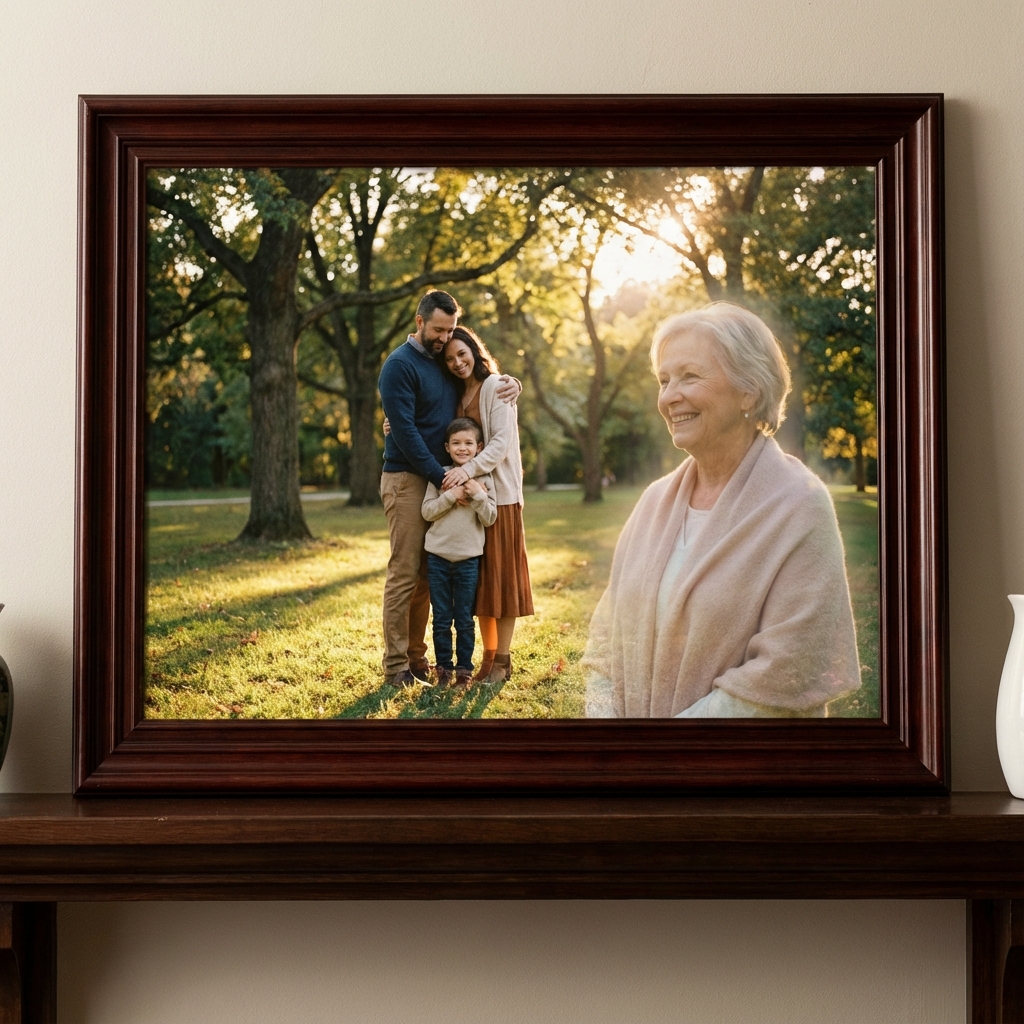
Soft glow effects and heavenly touches that create a spiritual, guardian angel presence.

๐Ÿ“œ

Vintage/Sepia

Classic vintage styling with sepia tones that gives a timeless, nostalgic feel to the memorial.

Wedding Memorial Photo Editor Features

Advanced AI technology meets compassionate design to help you create meaningful wedding memories with deceased loved ones.

๐Ÿ‘ฐ

Wedding Day Presence

Include deceased parents, grandparents, or loved ones in your wedding ceremony photos and family portraits. Make them part of your special day.

๐Ÿ’’

Walking Down the Aisle

Create touching images of your deceased father walking you down the aisle, fulfilling the dream he had for your wedding day.

๐ŸŽจ

Multiple Artistic Styles

Choose from charcoal sketches, watercolor, oil painting, photorealistic, or ethereal angelic styles to match your wedding aesthetic.

โšก

Instant AI Generation

Create beautiful memorial portraits in seconds with our advanced AI technology. No waiting weeks for expensive commission work.

๐Ÿ–ผ๏ธ

Print-Ready Quality

Ultra-high resolution (300 DPI) output perfect for wedding albums, canvas prints, framed wall art, and large format display.

๐Ÿ‘จโ€๐Ÿ‘ฉโ€๐Ÿ‘งโ€๐Ÿ‘ฆ

Family Portraits Complete

Add deceased grandparents, siblings, or other family members to wedding family photos. Create complete generational portraits.

๐Ÿ’

Respectful & Dignified

AI-powered blending creates natural, respectful compositions that honor your loved one's memory with dignity and grace.

๐Ÿ”’

Private & Secure

Your precious wedding and memorial photos are processed securely and deleted after generation. Complete privacy guaranteed.

๐Ÿ†“

Completely Free

No software downloads, no subscriptions required. Create your wedding memorial photos online, 100% free.

Ways to Include Deceased Loved Ones in Wedding Photos

From walking down the aisle to family portraits, create meaningful moments that honor their memory on your special day.

๐Ÿ’’

Deceased Father Walking Bride Down the Aisle

Create a touching, emotional image of your deceased father walking you down the aisle. Fulfill the dream he had for your wedding day and create a treasured keepsake.

๐Ÿ‘จโ€๐Ÿ‘ฉโ€๐Ÿ‘งโ€๐Ÿ‘ฆ

Family Wedding Portraits

Complete your family wedding photos by adding deceased grandparents, parents, siblings, or other family members to group portraits. Everyone who matters is present.

โœจ

Guardian Presence in Background

Place your loved one in the background of ceremony photos, creating an ethereal, watching-over presence. Subtle, beautiful, and deeply comforting.

๐ŸŽ‰

Reception & First Dance

Include deceased loved ones in reception photos, first dance moments, or seated at their traditional place at the family table. Celebrate with everyone.

๐Ÿ‘—

Mother of the Bride Moments

Add your deceased mother to getting-ready photos, dress fitting moments, or standing beside you at the altar. She can still be part of those special moments.

๐Ÿ‘ด๐Ÿ‘ต

Generational Wedding Photos

Create photos showing multiple generations together - grandparents who passed years ago with grandchildren getting married. A beautiful tribute across time.

How to Add Deceased Loved One to Wedding Photo

Create your wedding memorial photo in just 4 simple steps. Free, instant, and print-ready.

1

Upload Your Wedding Photo

Select the wedding photo where you'd like to add your deceased loved one. This could be a ceremony shot, walking down the aisle, family portrait, first dance, or reception photo.

2

Upload Photo of Deceased Loved One

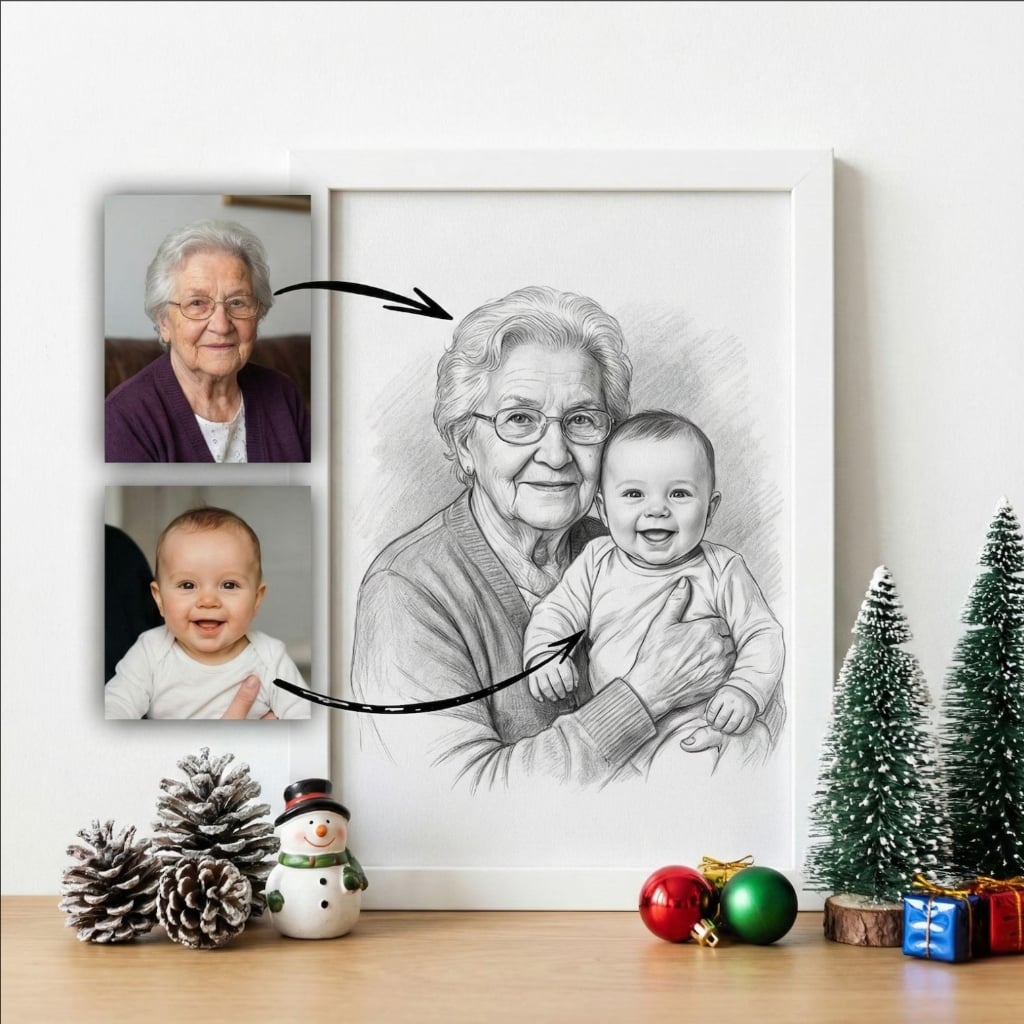
Choose a clear photo of your deceased parent, grandparent, or family member. Our AI works with photos from any era, including old black and white or vintage photographs.

3

Choose Style & Position

Select from artistic styles (photorealistic, watercolor, charcoal, oil painting, ethereal) and decide on placement - walking you down the aisle, prominent in family portraits, or subtle as a guardian presence in the background.

4

Download & Print

Receive your high-resolution wedding memorial photo instantly. Download and print for your wedding album, canvas prints, framed wall art, or display at the reception.

Touching Wedding Memorial Photo Stories

From couples who included their deceased loved ones on their special day.

"My father passed away two years before my wedding. Using this tool to add him walking me down the aisle was the most meaningful gift I could have given myself. It looks so natural - like he was really there. I cried happy tears when I saw it."

JM

Jennifer M.

Father Walking Down Aisle

Featured

"We added both of my wife's grandparents to our family wedding portrait. They passed before they could see their granddaughter get married. The watercolor style made it feel artistic and respectful. Now it hangs in our living room."

DK

David K.

Grandparents in Family Portrait

"The quality is incredible. We printed my late mother watching us from the background of our ceremony photo on a 30x40 canvas. Being able to have her at my wedding, even just symbolically, gave me so much peace and comfort."

SP

Sarah P.

Mother as Guardian Presence

AI vs. Professional Commission for Wedding Memorial Photos

Why couples choose our free AI wedding memorial photo editor.

Feature
Professional Artist
Our AI Tool
Cost
$200 - $500+
Free
Turnaround Time
2 - 6 Weeks
Seconds
Revisions
1-2 Included
Unlimited
Style Options
1 Style
6+ Styles
Print Quality
Varies
300 DPI
Multiple Poses
Extra Cost
Free

Tips for Perfect Wedding Memorial Photos

Follow these tips to create the most beautiful AI-generated wedding memorial photos.

Match the Lighting

For the most natural results, choose a photo of your deceased loved one with similar lighting to your wedding photo.

Use Clear Face Photos

Choose a photo where your loved one's face is clearly visible. Our AI can enhance quality, but clearer originals work best.

Consider the Style

Artistic styles like watercolor work well for ethereal memorial presence. Photorealistic is best for natural-looking album photos.

Try Multiple Options

Create several versions with different styles and placements. Since it's free and instant, experiment with unlimited variations.

Frequently Asked Questions

Everything you need to know about wedding memorial photos with deceased loved ones.

Our AI-powered wedding memorial photo editor makes it simple. Upload your wedding photo and a photo of your deceased loved one. Our system will seamlessly merge them together, matching lighting, perspective, and artistic style to create a natural-looking memorial portrait.

Yes, absolutely. Many couples use our tool to include deceased parents, grandparents, or other family members in their wedding photos. You can position them walking you down the aisle, standing in family portraits, or watching from the background as a guardian presence.

Yes, this is one of the most popular and touching uses of our tool. We can create a beautiful image of your deceased father walking you down the aisle, fulfilling the dream he had for your special day. The result looks natural and can be treasured forever.

Absolutely. Our advanced AI analyzes lighting conditions, shadows, and perspective to create natural-looking wedding compositions. You can choose from photorealistic styles or artistic renderings like charcoal, watercolor, or oil painting for a more timeless, memorial aesthetic.

Yes, background placement is one of our most popular options. This creates an ethereal, guardian-like presence that many couples find comforting - they're present but not overwhelming the main celebration. It's a subtle, beautiful tribute.

Yes! Our wedding memorial photo editor is completely free to use online. You can create unlimited wedding memorial photos without any cost. Premium features like ultra-high resolution downloads are available as optional upgrades.

Yes! All generated images are ultra-high resolution (300 DPI equivalent), specifically optimized for professional printing. They look stunning on canvas, in wedding albums, or as framed wall art.

Our AI generates your memorial portrait in seconds, not days or weeks. You can create multiple variations with different styles and positioning to find the perfect one for your special day.

Yes, you can add multiple deceased loved ones to a single wedding photo. This is perfect for including both grandparents, multiple family members, or creating a complete family wedding portrait.

Absolutely! Our AI is trained to handle photos from any era. It can automatically restore, enhance, and colorize old photos to match your modern wedding pictures perfectly.

We offer multiple styles including: Photorealistic (natural-looking), Charcoal Sketch, Watercolor, Oil Painting, Vintage, Ethereal/Angelic with soft glow effects, and more. Each style creates a unique memorial tribute.

Creating wedding photos with deceased loved ones is a beautiful, respectful way to honor their memory and include them in your special day. Many families find it deeply comforting to have a visual representation of their loved ones being present at the celebration.

The Complete Guide to Wedding Memorial Photos

What is a Wedding Memorial Photo?

A wedding memorial photo is a photograph that has been edited to include a deceased loved one who couldn't be present at the wedding. Using advanced AI technology, these photos seamlessly blend images of the deceased with wedding photographs to create touching tributes that appear natural and beautiful.

Adding Deceased Father Walking Bride Down the Aisle

One of the most emotional requests we receive is from brides who want to create an image of their deceased father walking them down the aisle. Our AI can create this touching scene, showing the moment that could never happen in reality but lives forever in your heart. These images become treasured keepsakes that honor the relationship between father and daughter.

Including Deceased Grandparents in Wedding Photos

Many couples want to add deceased grandparents to their wedding family photos. Whether they passed away years ago or recently, our AI can seamlessly include them in group portraits, creating complete family photos that span generations. It's a beautiful way to honor those who helped shape who you are.

Artistic Styles for Wedding Memorial Photos

Our AI wedding memorial photo editor offers multiple artistic styles to suit different preferences:

  • Photorealistic: Natural-looking photos for wedding albums and professional prints.
  • Watercolor: Romantic, dreamy style that adds an artistic quality to memorial portraits.
  • Charcoal: Classic, timeless illustration style for elegant memorial art.
  • Ethereal/Angelic: Soft glows and heavenly touches for spiritual memorial presence.
  • Oil Painting: Rich, textured style for museum-quality memorial portraits.

Printing Your Wedding Memorial Photos

All AI-generated wedding memorial photos are high resolution (300 DPI) and perfect for professional printing. Popular print options include:

  • Wedding Albums: Include memorial photos alongside your regular wedding photos.
  • Canvas Prints: Large format prints for display in your home.
  • Framed Wall Art: Create a beautiful tribute to display year-round.
  • Memorial Display: Print for display at the wedding reception.
๐Ÿ’’
๐Ÿ’
๐Ÿ’
โค๏ธ

Honor Their Memory on
Your Special Day

Free AI wedding memorial photo editor. Add deceased parents, grandparents, and loved ones to your wedding photos. Create touching tributes in seconds.

๐Ÿ’’ Create Wedding Memorial Photo Free
No credit card required
Unlimited creations
Print-ready quality